Flow & Paywall builder: Build onboarding and paywalls, ship them without a release

TL;DR:
- 89.4% of trial starts happen on Day 0. Everything that decides your subscription revenue happens between the first open and the first payment, and most of it still ships on your release train.
- The Flows & Paywall builder is one editor for that whole stretch. Change a screen, run the test, push the winner live, with no build and no store review.
- Screens render natively, the paywall reads what someone answered in onboarding, and you can target a flow down to a single Apple Ads keyword or a single Meta ad creative.
You have a queue of tests for this quarter. A shorter onboarding. A paywall that names the goal the user picked two screens ago. A post-purchase upsell. Every one of them sits behind a build, so the queue moves at the speed of the release train. Variant B ships six weeks late, and the creative that fed it has already been swapped out.
So teams test the paywall, because the paywall is the screen they can reach on their own. Onboarding lives in app code. The data that would connect the two lives in neither place.
The Flows & Paywall builder puts every screen between the first open and the first payment in one editor, and the person who owns the funnel owns the editor.
What is the Flow & Paywall builder?
It's Adapty's visual editor for onboarding and paywalls, built as one multi-screen flow.
A flow is one configurable object holding every screen between app launch and paid conversion: welcome screens, surveys, onboarding, paywalls, and post-purchase. Inside it, you connect screens, branch based on what users answer, and define variables that carry data forward. You build it visually and ship it from a dashboard.
Onboarding and paywall stop being two builds with a handoff between them. What someone answers in onboarding decides what the paywall shows them.
Seven flows you can build without engineering
Below are seven flows real apps run today, from a single-survey onboarding to per-keyword attribution targeting. Each one is a capability cluster you can use on its own or combine.
1. Personalized onboarding by goal
A sleep and mindfulness app team wants the onboarding to feel like a one-on-one consultation. The user enters their name early, and from that point, every screen calls them by name. The team adds diagnostic surveys, social proof, and a plan projection along the way. By the time the paywall arrives, the offer reads as the conclusion of a personalized assessment.
The flow
- Welcome screen with a direct question, positioning copy, and social proof ("Join 18,000+ users").
- Name capture: "First, what should we call you?" Every screen from here on calls the user by name.
- A diagnostic sequence: how the user feels, how bad it is, what's making it worse, and whether they've tried meditation before. The flow stores each answer. If the user says they've tried meditation, a follow-up question asks what got in the way.
- Social-proof break: "You're not alone in this. 1 of 3 adults face this. 85% see improvement with the right plan."
- Testimonials screen: "People just like you made it work," with star ratings and quotes from users who reported the same problems.
- Consequence visualization: a curve showing what happens to sleep problems left untreated.
- Plan projection: "Here's what the next 4 weeks look like for you." Week-by-week milestones tailored to what the user said.
- Final screen and paywall: "Your plan is ready." CTA: "* Try free for 7 days.*"
What's happening underneath
The flow asks a short series of questions and stores each answer. Later screens read those answers and use them in headlines, social proof, and the plan projection. Some questions only show up based on earlier answers. The meditation follow-up only appears if the user has tried meditation before.
2. Quiz-to-paywall with computed variables
A fitness app team wants to ask the user a few questions, compute a personalized timeline ("you can hit your target weight in 2-3 weeks"), and show the paywall with social proof and testimonials filtered to the user's specific goal. By the time they reach the paywall, every part of it references something they typed. The comparison table even speaks to the obstacles they just named.
The flow
- Name capture and goal selection. The user enters their name and picks a main goal (lose weight, build muscle, get fit, improve flexibility).
- A short quiz: height and weight with unit toggles, activity level, workout frequency, and fitness self-assessment. The flow stores each answer.
- A script reads the user's current weight, target weight, activity level, and workout frequency, then computes a personalized timeline to reach the target.
- Goal-conditional social-proof break: "Others with your goal made it work." Stats change based on which goal the user picked earlier ("* 78% of users who set a specific goal actually reach it*," plus the computed weekly weight-loss rate based on their target).
- Barrier question: "What's got in the way before?" The user multi-selects from a list of obstacles that have stopped them in past attempts.
- Paywall: The headline names the user's goal, the body uses their name, the value prop shows their computed timeline, and the comparison table addresses the barriers they just named.
What's happening underneath
The user can enter height and weight in their preferred units (cm or inches, kg or pounds), and the flow converts everything to one internal unit before storing. A script then calculates the timeline to the user's target from the answers they just typed in.
3. Branching to different paywalls based on quiz answers
A nutrition app team wants the paywall to match the goal the user picked in the quiz. A user who selected "lose weight" lands on a paywall built around the timeline to their target weight. A user who selected "eat healthier" lands on a different paywall, built around habit change. One flow, one quiz, two paywall endings.
The flow
- Welcome screen with social proof at the top: "10K reviews, 4.9 rating."
- Three explainer screens: meal tracking with AI, understanding your body data, and recipe suggestions.
- Name capture: "First, what's your name?" The flow stores it.
- Goal question: "What brings you to the app?" Seven options to pick from, including Lose weight, Eat healthier, and All of the above.
- Engagement break: "You're in the right place, [name]." Below the headline: "* The App has helped 3.8M users to [their goal answer].*" Then a testimonial.
- The quiz keeps going with questions about gender, eating habits, meals per day, allergies, birthday, height, current weight, and target weight.
- Loader screen: "Adjusting your personalized journey."
- Personalized plan screen: a chart showing the user's current weight curving down toward their target, plus a plan description that uses their answer for meals per day.
- Paywall A, for users who picked a weight goal. The headline gives them a timeline to their target weight. The plan focuses on calorie tracking and meal logging.
- Paywall B, for users who picked a habit or learning goal. The headline talks about building lasting habits. The plan focuses on food guidance and nutrition education.
What's happening underneath
The flow saves each answer the user picks. At the end of the quiz, a rule checks what the user said their goal was, and shows them whichever paywall matches. Both paywalls live inside the same flow, so the team builds them together and ships them together.
4. Win-back with name greeting, value recap, and short-fuse countdown
A VPN app team wants to bring back users who left. The flow opens by name, reminds them what they used to have, and offers a discount with a 5-minute clock.
The flow
- Welcome-back screen: "Welcome back, [name] 👋 We missed you!" with a friendly character and a Continue button. The flow already has the user's name from when they originally signed up.
- Value-recap screen: "We've saved a special deal for you." A checklist of what they used to have: private browsing, unblock streaming, 400+ servers, and a no-logs policy. Button: "* See my offer.*"
- The discount paywall: "Claim Premium before it's gone." A 5-minute countdown ticks at the top. "-50%" over a gift box graphic, then the price: $1.54 a week, with the yearly price ($79.99) below.
- If the user doesn't buy before the timer hits zero, the discount disappears, and they see standard pricing.
What's happening underneath
The flow shows up only for users who haven't opened the app in a while. The team picks the wait time, usually two weeks. The 5-minute countdown is a real timer. When it runs out, the discount is gone, and the user sees the standard offer instead.
5. Permission request plus paywall
A nutrition app team wants notification permission from as many users as possible. The flow asks right after the user pays. The user just spent money on the product, which is the strongest signal that they care about staying engaged with it.
When the user taps "Turn on notifications," the standard iOS prompt opens. The flow saves whether the user said yes or no. Later, the team uses that to decide whether to send notifications or skip the user.
6. Attribution-powered flow targeting
A team running paid ads across multiple channels wants each new install to land in a flow that matches where they came from. Someone who searched Apple Ads for "ai animation generator" has a different intent than someone who tapped a broad TikTok video. The team builds a different flow for each source and routes installs to the right one.
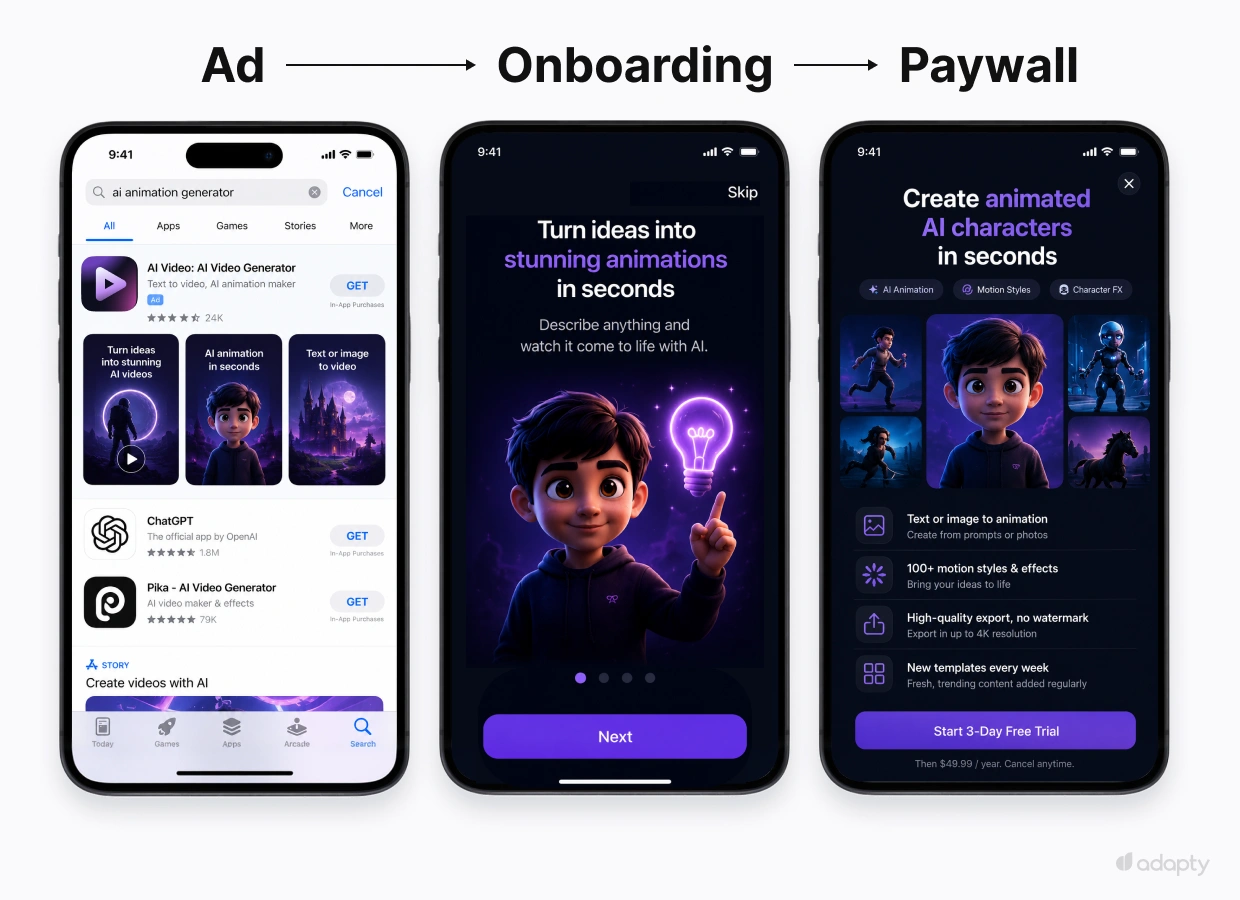
The flow
| Acquisition source | Flow shown | Why |
| Apple Ads keyword: "ai animation generator" | Skip onboarding → direct annual plan at $79.99/year | High intent, brand-aware |
| Apple Ads keyword: "free animation app" | Full onboarding → trial-first weekly at $4.99/week | Price-sensitive, needs a value demo |
| Meta video ad showcasing premium | Short feature recap → annual with discount | Already saw the pitch, close the sale |
| TikTok campaign | Short gamified onboarding → monthly $9.99/mo | Younger audience, lower commitment |
| Organic/direct | Full onboarding + feature highlights → all plans | Unknown intent, show full value |
What's happening underneath
When a new user opens the app, Adapty checks where the install came from (which Apple Ads keyword, which Meta ad, which TikTok campaign, or organic) and picks the matching flow. The team builds all five flows in the same dashboard and sets a targeting rule for each. No engineering involvement, no app release.
ℹ️Most paywall builders can target by country or by subscription status. Per-keyword and per-creative targeting needs the attribution layer and the builder to be in the same product. Adapty is the only one that does both, so the team picks targeting all the way down to a single Apple Ads keyword or a single Meta ad creative without connecting to an external MMP.
For the longer argument on why ad creative and post-install onboarding need to tell the same story, see Creative-funnel match: Why your ads and your onboarding need to tell the same story.
7. Geo-personalized pricing and copy
A team selling in Brazil, Japan, and the United States wants to charge prices that fit each country's economy, show copy in each country's language, and run promotions in specific regions when it makes sense. One flow covers all of it.
What the team does
The team builds one flow. Then, inside the flow editor:
- Translates the copy in one click. The flow editor has AI translation built in. One click translates the whole flow into the target language, and the team can review and tweak the wording.
- Targets the right users. Country and language are targeting options, the same as anything else. The team picks the segments and assigns the matching prices and copy.
Subscription prices vary 4x between countries in our dataset. An app that uses one global price loses revenue in high-paying markets and prices out users in lower-income ones. With regional pricing, the flow stays the same everywhere; the prices and the language are the only things that change per market.
How it works under the hood
Native rendering
Each screen renders as a real native UI component. No HTML in a WebView. Screens open instantly, text scales with the user's iOS settings, VoiceOver reads them aloud, and they look like screens an engineer coded by hand. Adapty delivers flows through a CDN with 300+ points of presence, and the SDK falls back to a local copy when the device is offline. See Native paywall rendering for the full pipeline.
Server-driven configuration
A flow stores variables (text, numbers, booleans, lists). You define them yourself, elements generate them (a survey creates a selected option, a slider creates a number), or your app passes them in through the SDK. Scripts combine variables into new ones, so any calculation that would otherwise need an engineer runs inside the flow. When the flow ends, the SDK hands every variable back to the app, including the computed ones.
Attribution as a targeting input
The acquisition source sits in the same targeting menu as country, language, and subscription status. Target a flow to an Apple Ads keyword, a Meta creative, a Google or TikTok campaign, or all organic installs.
The loop keeps running
Once your flow is live, three parts of Adapty work on it together. Growth Autopilot watches performance and proposes the next experiment, written in plain English. Flow Builder is where you check the brand, edit the copy, and build the variant. Flow-level A/B testing measures the result, and Autopilot uses the winner to propose the next experiment.
The takeaway
One editor holds everything between the first open and the first payment. You change a screen, ship it to live users, watch the result, and move again, on your own schedule instead of the release schedule.
Build your first flow
Open the builder and start a flow on your own funnel. Explore Flows & Paywall builder
Or book a demo, and we'll walk you through it.