Apple Search Ads in 2026: cost, placements, and bidding

TL;DR:
- Apple Search Ads is Apple's advertising platform for the App Store, renamed Apple Ads in April 2025.
- You bid for placement in search results, the Search tab, the Today tab, and other apps' product pages.
- Apple Ads Advanced charges you per tap. Apple Ads Basic charges you per install.
- Use Apple Ads Basic for testing (auto-managed, capped monthly budget) or Advanced for full control (unlimited budget, all four placements).
- A tap costs $1.58 in the US, and $0.11 in Algeria, and the cheapest markets often convert better.
- Apple's reporting stops at the download, so connect campaigns to what happens after.
Apple Ads remains one of the most effective ways to acquire high-intent users for iOS apps. Users who arrive from it start trials at 3.66%, against 1.45% from other paid channels, and convert to paid at 1.92% against 0.91%.
Those are channel averages. Whether your campaigns match them, and which of your keywords carry the difference, is a question Apple cannot answer. Its dashboard reports impressions, taps, and downloads, then stops, so you never learn which keyword produced a subscriber.
This guide covers what it costs by market and niche, how the four placements work, how to bid since Apple replaced the CPA cap, and how to close the gap Apple's reporting leaves.
What are Apple Search Ads?
Apple Search Ads is Apple's official advertising platform for the App Store. Apple renamed it Apple Ads on April 14, 2025, after placements expanded beyond search results. Both names describe the same product, and most advertisers still say the old one.
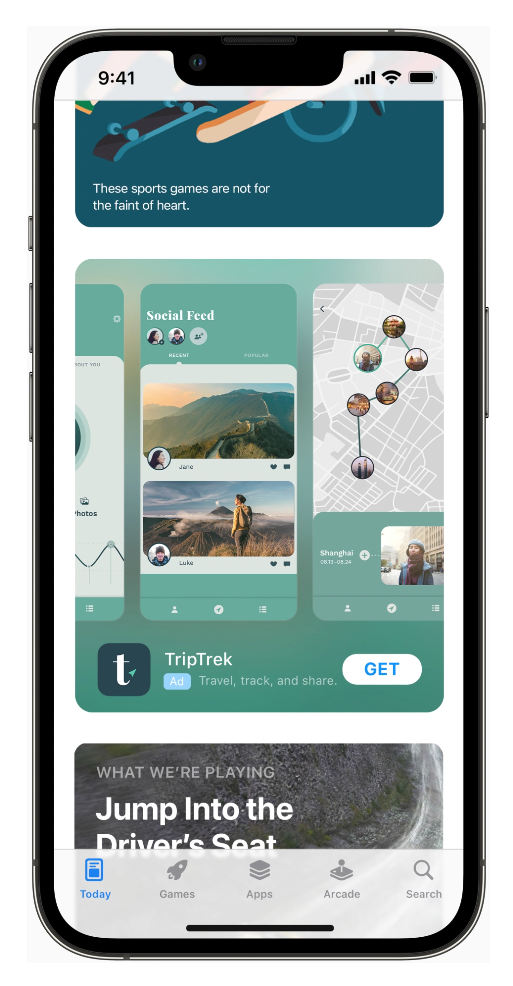
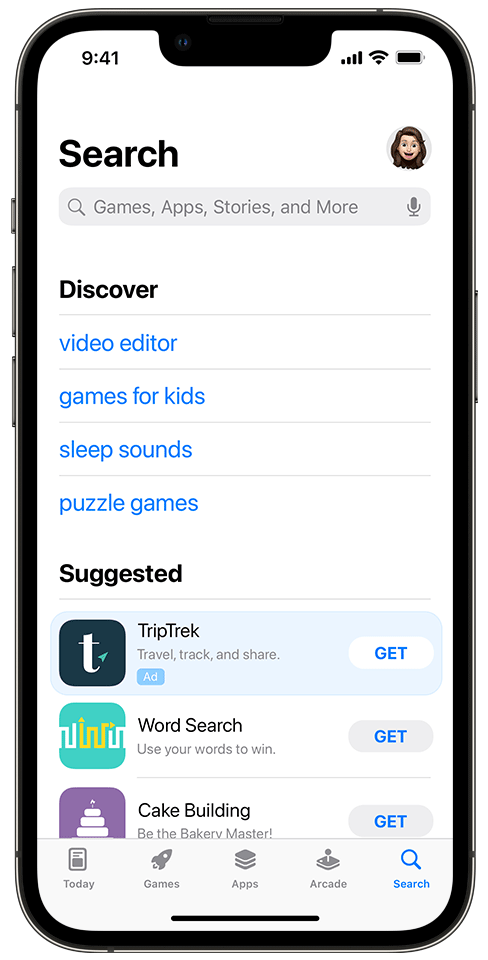
 Left to right: the Today tab, the Search tab, search results, and another app's product page. Apple Ads can run in all four
It comes in two versions. Apple Ads Basic manages your campaigns for you, with a monthly budget cap and one placement. Apple Ads Advanced gives you keyword bidding, all four placements, and no budget ceiling.
Which version should you use?
Pick Basic to test whether App Store advertising works for your app at all. Pick Advanced if you want keyword bidding, all four placements, or if you are optimizing for subscription revenue.
| Apple Ads Basic | Apple Ads Advanced | |
| Pricing model | Cost per install | Cost per tap, plus target CPA on search results campaigns |
| Who can use it | App owners only | Developers, advertisers, and agencies |
| Apps per account | Capped | Unlimited |
| Monthly budget per app | Capped | Unlimited |
| Placements | Search results only | Today tab, Search tab, search results, product pages |
| Creative control | Apple builds your ads | Custom Product Page variations |
| Bidding | Apple manages it | Manual CPT or Maximize Conversions |
| Reporting | Downloads and cost per download | Impressions, taps, downloads, campaign structure |
⚠️Neither version reports what happens after the download.
Apple Ads Basic
Best for: a first test of whether App Store advertising works for your app.
You set a budget. Apple handles keywords, bids, and creative.
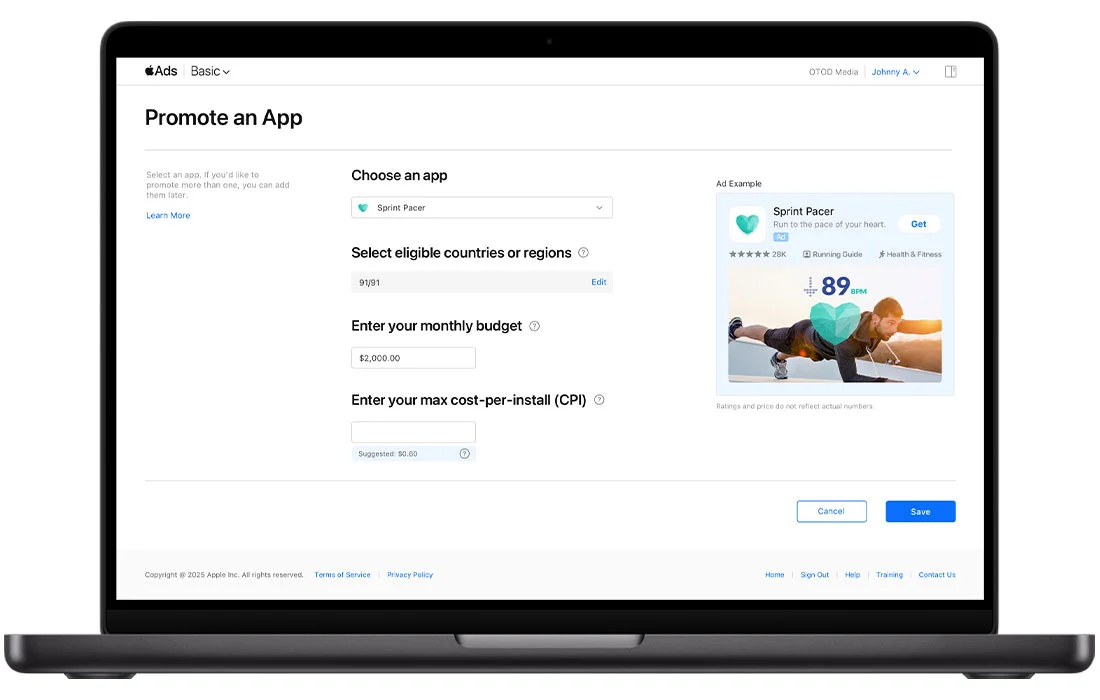 The whole of Basic setup: the app, the markets, a monthly budget, and a max cost per install
What you get: cost-per-install pricing, one placement at the top of search results, a cap on apps per account, and a monthly budget ceiling per app. Check Apple's current limits before you plan around them.
What you give up: keyword control, targeting, and any reporting past the install.
Setting up Basic
Step 1: Choose your countries
Start with three to five where your app already performs organically, then expand once you know which ones convert. Look past the obvious markets while you do it. Of the top 20 countries by tap-through rate, 19 cost under $0.65 per download, and most cost under $0.40.
Step 2: Set a monthly budget
Increases take effect at once. Decreases wait for the next calendar month, because Apple needs time to adjust pacing.
Step 3: Set a max cost per install
Apple suggests a figure from your category, competitor bids, and your history. Start there or 10% to 20% above. Bid low, and you win few impressions. Bid high, and you win visibility that your unit economics may not support.
What Basic automates
Apple matches your ads to searches using your App Store listing, your category, and similar apps. It builds the creative from your existing assets, which makes your listing ad. That is why Custom Product Pages matter even on Basic, and why what you give Apple to work with changes your results.
The gap in Basic
Basic reports 100 downloads at $3.50 each. It reports nothing about how many started a trial, which ones became paying subscribers, what you earned back, or what any cohort is worth over time.
Run budget decisions on download counts, and you will pause an expensive keyword that delivers your best subscribers, then scale a cheap one that delivers nobody. Connect Basic to revenue attribution first.
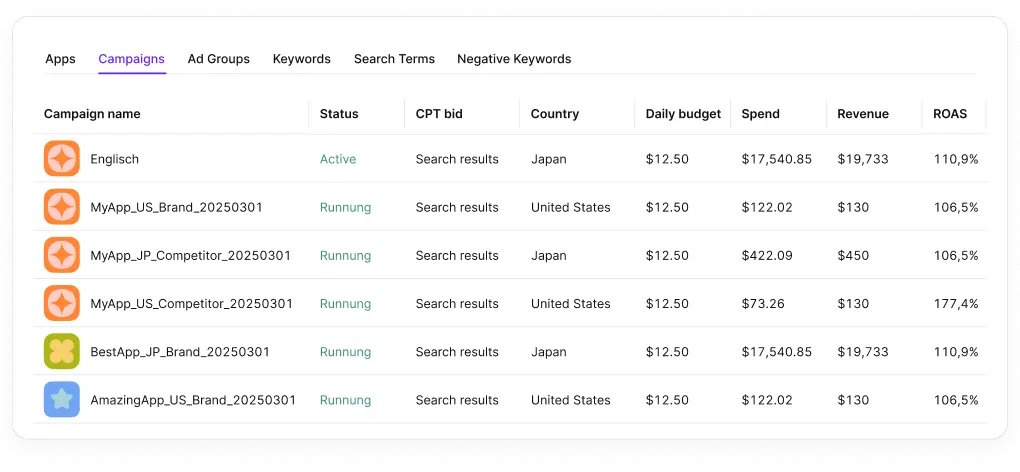 Apple gives you the spend column. Revenue and ROAS only appear once campaigns are connected to subscription events
Setting up Apple Ads Advanced
Best for: keyword control, unlimited budgets, and all four placements.
Advanced prices per tap, so you pay when someone engages with your ad rather than when they download.
Step 1: Choose your placements
Advanced prices per tap, so you pay when someone engages with your ad rather than when they download:
Today tab
Users land here when they open the App Store. Today tab ads reach them in discovery mode, before they search. Use it for awareness and seasonal pushes.
Search tab
Your ad appears in the Suggested section before anyone types. Apple builds it from your app name, icon, and subtitle. Use it to catch intent early and to run conquest campaigns.
Search results
Your ad appears above organic results for the keywords you target. Since March 2026, this placement carries more than one position on devices running iOS 26.2 or later, so a single query can show several of your competitors at once. Relevance gates every position, so a high bid alone wins you nothing. Use it for keyword acquisition and to defend your branded terms.
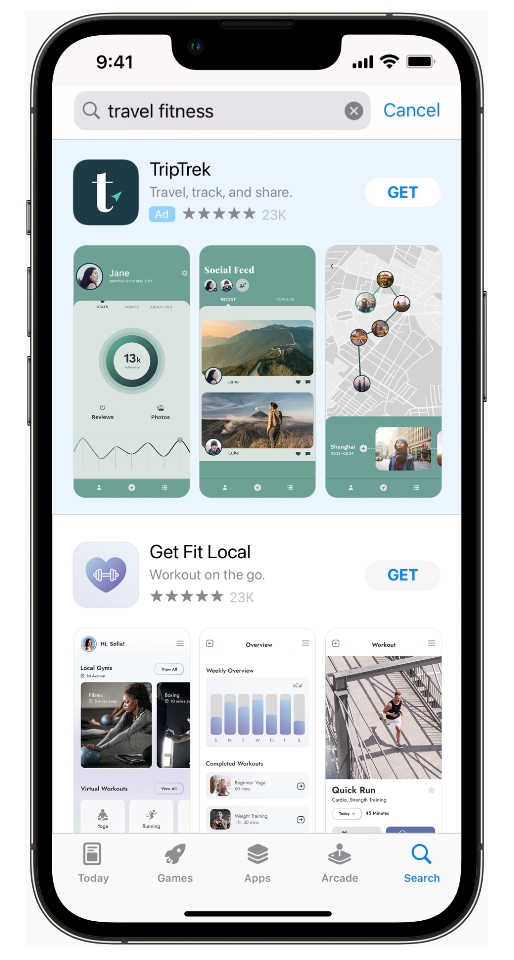
Product pages
Your ad appears in the "You Might Also Like" section of other apps' listings, in front of users comparing their options. Use it for conquest and category expansion.
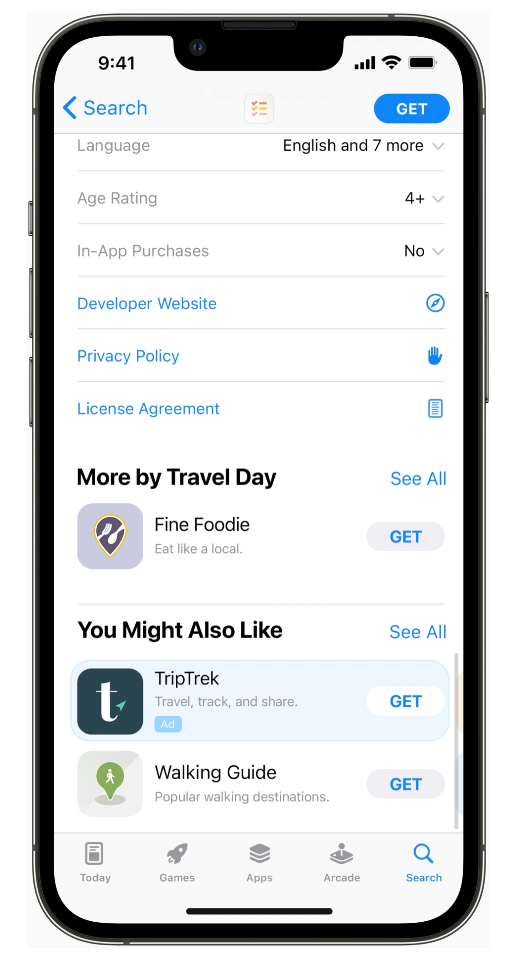
Step 2: Geographic targeting & market strategy
Group similar markets to simplify bid management while keeping regional budget control.
Split campaigns by country wherever spending justifies it. Cost per tap varies 14 times across markets, so one campaign spanning cheap and expensive countries lets the expensive ones eat the budget.
Step 3: Campaign setup
Name campaigns with a convention you can filter later, for example FitnessApp_US_Branded_Q3. Set a daily budget knowing Apple may exceed it on high-opportunity days, which makes your effective monthly spend your daily figure times 30.4. Use start and end dates for launches and seasonal pushes.
Step 4: Ad group architecture
Ad groups hold related keywords under shared bidding and targeting. Five structures cover most accounts:
- Branded. Your app name and its variations.
- Competitor. Rival app names.
- Category. Generic terms like "fitness app" or "meditation".
- Feature. Specific functionality like "calorie counter" or "workout timer".
- Discovery. Search Match is enabled for mining new keywords.
Step 5: Choose your bid strategy
Apple changed this more than anything else. You now pick between two approaches.
Manual cost-per-tap bidding. You set a max CPT bid at the ad group level and override it per keyword where you need precision. Apple suggests bids from your category and competitive data. Use manual bidding to protect branded terms, and anywhere your bids need to reflect revenue data that Apple cannot see.
Maximize Conversions. You set a target cost per acquisition and a daily budget, and Apple bids on each query. Apple opened this strategy to all advertisers in February 2026, replacing the older CPA cap. Apple creates a locked automated ad group with Search Match enabled to run exploration. You can add a manual ad group alongside it, and you keep the negative keywords.
Three things to know before you switch:
- The target is an average, not a ceiling. Apple bids above it where it expects a conversion. Your daily budget is what caps spend.
- Search Match is required, so you give up control over which queries take your money.
- It optimizes for downloads. It cannot see trials, subscriptions, or retention, which, for a subscription app, is where the campaign succeeds or fails.
That third constraint decides how to use it. Run Maximize Conversions for discovery, keep manual bidding on terms you know convert, and set the target CPA from your own revenue data. Feed it Apple's download reporting instead, and you will optimize toward cheap downloads.
Step 6: Match types
Broad match catches related variations. Bid on "weight loss app" and your ad can show for "diet tracker".
Exact match shows your ad for the precise phrase only. Use it for branded terms and high-intent keywords.
Search match lets Apple match your ad from your listing and category data. It finds long-tail keywords you would never think to bid on. Run it in a dedicated discovery ad group and promote the winners into manual bidding.
Step 7: Keyword research
Apple suggests keywords from your app and similar apps, and you add your own.
General terms like "fitness" build awareness and burn budget. Specific terms like "HIIT workout timer" bring better users. Branded terms defend your territory, and competitor terms catch people comparing alternatives.
Review the list on a schedule. Pause what does not pay back and promote your Search Match discoveries into dedicated ad groups.
Step 8: Product page settings
Choose which categories show your ads. All categories buy reach, your own category buys relevance, and similar categories sit between them.
Step 9: Targeting
Layer demographics, device targeting, and behavioral signals. Narrow targeting cuts impression volume and raises relevance.
Step 10: Scheduling ad groups
Launch ad groups in phases. Schedule around your conversion windows if weekdays outperform weekends. Preview your ads in each placement and customize variations with Custom Product Pages where the placement supports it.
What changed in Apple Ads recently
Three platform changes affect how you bid.
- Maximize Conversions replaced the CPA cap. Apple opened Maximize Conversions to all advertisers in February 2026. The old CPA cap put a hard ceiling on every keyword, so your bid never went above it, even on the terms worth most to you. The new target is a campaign average. Apple bids above it where it expects a conversion and below it elsewhere. See Step 5 above for how to run it.
- Search results now carry more than one ad. Apple began adding ad positions to App Store search results on March 3, 2026, starting in the United Kingdom and Japan and reaching other markets by the end of that month. Devices need iOS 26.2 or later. You get more inventory and more competitors in every auction.
- Apple widened where its ads can run. Apple's updated Advertising Services Terms of Service took effect on July 28, 2026. The clause defining where Apple places your ad no longer limits delivery to Apple software and devices. Apple has named no product, market, or launch date. Read it as a change in what Apple may do, not a change in where your ads run today.
Apple Ads cost benchmarks by market and niche
The short answer sits near the top of this page. Here is the full picture.
Across 90 markets, the median download costs $0.51. Weighted by spend, the average is $1.34, which shows you where the budget goes: into the expensive markets.
Cost by market
A tap costs 14 times more in the United States than in Algeria.
| Market | Cost per tap | Cost per download | Conversion rate |
| United States | $1.58 | $2.51 | 62.7% |
| China | $1.25 | $2.54 | 49.3% |
| United Kingdom | $1.01 | $2.02 | 64.7% |
| Australia | $0.95 | $1.89 | 61.8% |
| Germany | $0.86 | $1.34 | 63.9% |
| France | $0.75 | $1.11 | 67.3% |
| Brazil | - | $0.41 | 71.2% |
| Algeria | $0.11 | $0.18 | - |
Global medians sit at $0.32 per download and 62.2% conversion.
China and the United States pay within three cents of each other per download, $2.54 against $2.51, and convert 13 percentage points apart. France costs less than half the US and converts better than either. Price tells you almost nothing about what a market will do for you.
Cost by niche
Your category moves your cost more than your bidding does. Across 59 niches, the cost per download spans 30 times.
| Niche | Cost per download |
| Screen Recorder | $0.34 |
| Religion | $0.40 |
| Video Players | $0.55 |
| VPN | $0.60 |
| Weather | $0.69 |
| Health & Fitness | $3.02 |
| Yoga | $3.97 |
| PDF Reader | $4.31 |
| Notes | $6.53 |
| Exam Preparation | $10.34 |
Conversion explains some of that spread. PDF Reader costs $4.31 and converts at 78%, so most taps become downloads. Yoga costs $3.97 and converts at 54%, so half of every tap buys you nothing.
What moves your cost
Competition for the keyword. Head terms that name your core function pull every competitor in your category. The price on those terms tells you what your rivals' lifetime value can carry. When several of them outbid you there for months, look at their pricing and packaging before you raise your bid again.
Relevance. Apple gates every placement on relevance. An app that does not match the query stays hidden at any bid.
Placement. Search results, the Search tab, the Today tab, and product pages each price differently.
What a tap costs, and what a subscriber costs
Those are separate questions, and markets rank differently on each.
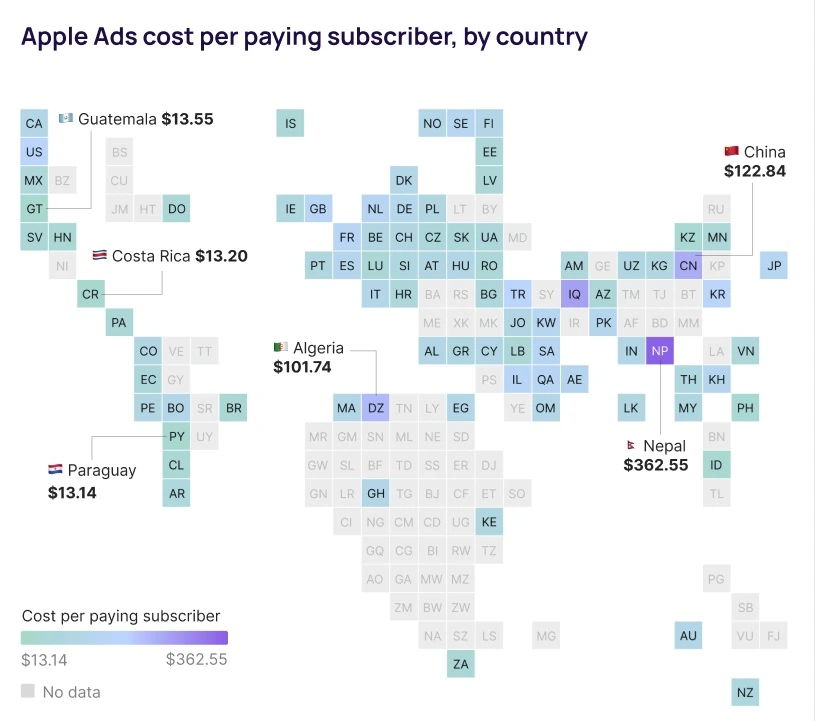
Median year-1 lifetime value across all markets is $26.04. The United States reaches $48.25, fifteenth on the list, and returns 15 paying subscribers per $1,000 of spend. Brazil returns 65.
Tier 2 and Tier 3 markets carry lower lifetime value and much lower acquisition costs, and the second more than covers the first. A paying subscriber costs under $20 in 24 countries, and under $14 in Guatemala, Costa Rica, and Paraguay. Nepal costs $362.55 per paying subscriber, which pays back for almost no app.
So, read the cost per paying user by country and keyword rather than cost per tap.
Custom Product Pages: 23% more downloads
A Custom Product Page is a variant of your App Store listing built for one keyword intent. Apple allows up to 35 per app.
Matching the page to the keyword pays at two separate moments. Before the tap, the tap-through rate rises from 9.72% to 10.90%, because a relevant page wins more taps from the same impressions. After the tap, conversion rises from 63.91% to 70.05%, because the page confirms the user chose correctly.
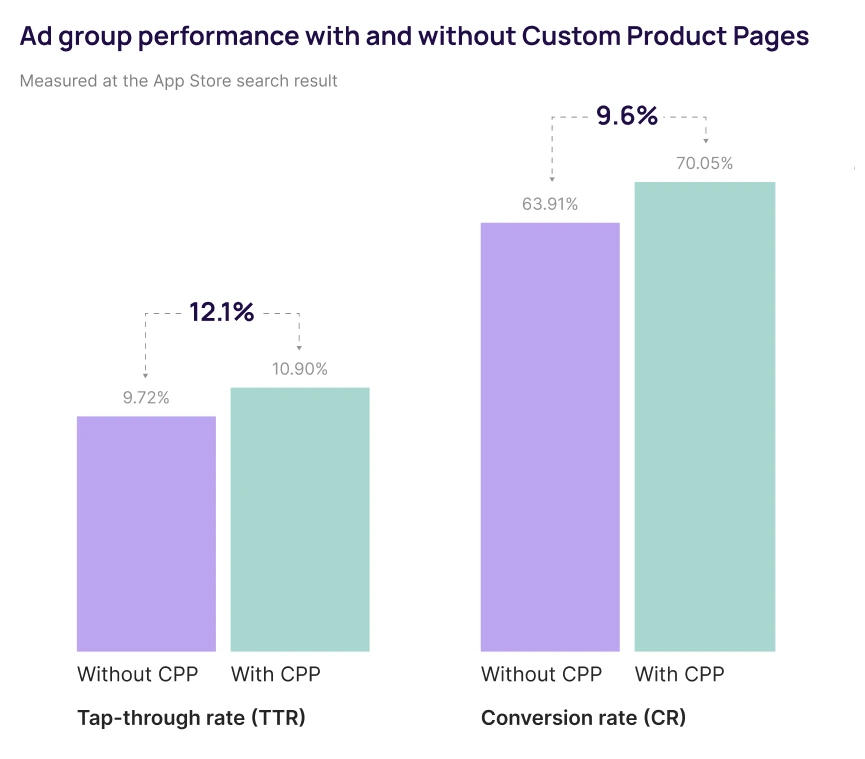
Those compounds. At baseline rates, 1,000 impressions produce 62 downloads without a Custom Product Page and 76 with one, a 22.9% increase.
Build your pages around intent clusters rather than one per keyword. Three to five clusters cover most apps and scale better than 35 near-duplicates.
A Custom Product Page that lifts conversion can still cut your trials. If the page promises one thing and your paywall shows another, you win the download and lose the subscriber.
Matching paywalls to Apple Ads keywords: 76% more paying users
Custom Product Pages shape what someone sees before installing. Your paywall shapes what they see after. When those two disagree, the pre-install win turns into a post-install loss.
Match the paywall to the search intent that drove the install and conversion rises at both stages. Install to trial goes up 41.5%, because the paywall reflects what the user searched for. Trial to paid goes up 24.2%, because the app delivers what the paywall promised.
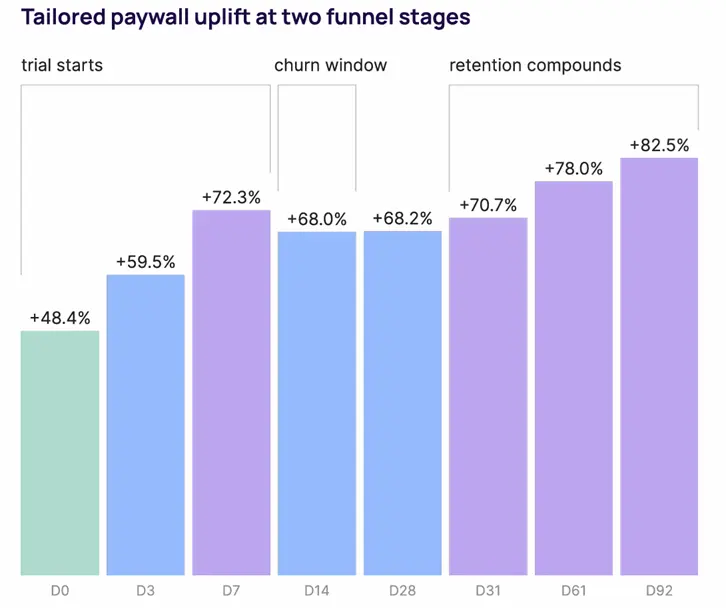
Compounded, 100 installs that produce one paying user on a default paywall produce 1.76 paying users on a tailored one.
Stop measuring at Day 7, and you sit inside the churn window, where the effect looks half its real size. Users matched to their own intent renew longer, so the curve keeps climbing well past the point most teams close the report.
Map your Apple Ads keywords to three to five intent clusters, give each cluster its own paywall through paywall targeting, then A/B test the variants against revenue rather than conversion rate.
Apple Search Ads reporting: where the data stops
Apple reports campaign performance in the Apple Ads dashboard and through the Apple Ads Campaign Management API. You see impressions, taps, downloads, and cost per download, split by campaign, ad group, and keyword.
To use that data anywhere else, you export it from the dashboard or pull it through the Campaign Management API, which is what any third-party connector reads. Either route lands the numbers in Excel, Google Sheets, or a BI tool, because ad spend and subscription revenue live in different systems, and someone has to join them.
Until you join them, three questions stay open. Are these downloads becoming trials? Are those users still paying in month three? Which keywords bring the highest lifetime value? Neither Basic nor Advanced answers any of them.
Closing that gap needs three things: keyword-level visibility into trials and subscribers, one basis for comparing paid channels, and decisions made on revenue instead of download volume.
How Adapty Ads Manager extends Apple Ads
Adapty Ads Manager closes that gap. It connects through Apple OAuth with no MMP, and carries attribution past the download to trials, subscriptions, and revenue, so ROAS and LTV sit against each keyword rather than each campaign. From there, you manage campaigns and bids in one place, set rules that promote converting search terms and pause the ones that never pay back, and build paywall segments from any campaign, ad group, or keyword. That last one is the mechanism behind the 76% lift above.
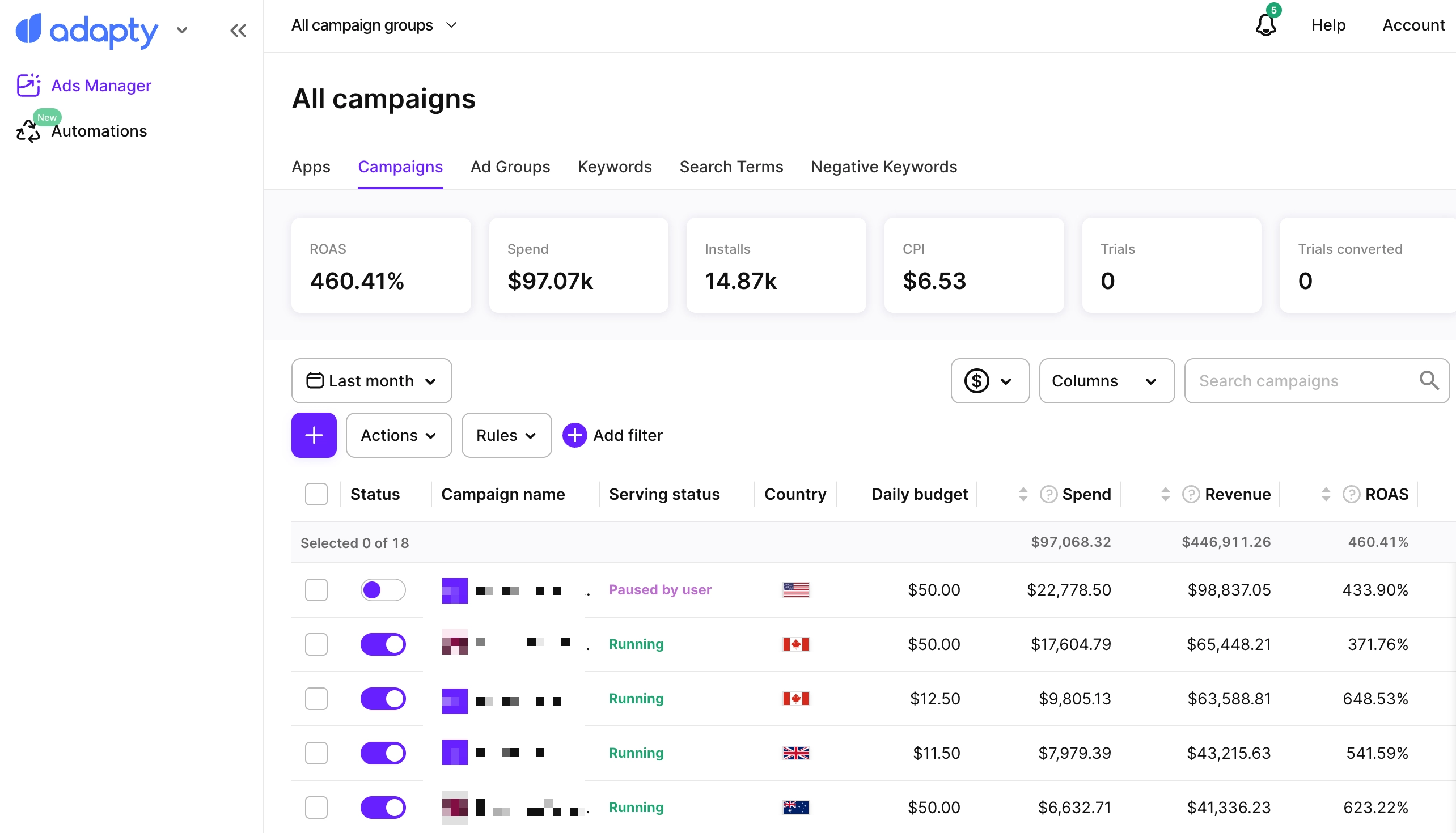
Across 8,000+ apps, Apple Ads users convert to paid at 1.92% against 0.91% from other paid channels. Connected this way, cohorts and funnels tell you whether your own account matches, which keywords carry the difference, and how retention moves across 7, 30, and 90-day windows. You can also route paid iOS traffic to a personalized paywall matched to the keyword that brought the user in.
Keep reading
For attribution frameworks, keyword segmentation, and ROAS-based bidding, read How to analyze and optimize Apple Search Ads. For campaign structures and scaling, read Apple Ads best practices. For the full dataset behind these figures, download Apple Ads for Subscription Apps 2026.
Ready to connect downloads to revenue?
One Apple OAuth click, and keyword-level revenue in under an hour.